Moving Azure Consumption Function Apps to single AppService


In Azure, it is often the case that over time, a large number of legacy Consumption Plan Apps are created because as developers we experiment, we develop and then we forget about them as living resources in the Azure subscription! Consumption Plan Function Apps are usually left out in accounts and forgotten about because these are fairly low impact and low cost. Due to the throw away nature that they can easily become, it is very possible that that our Azure estate becomes messy because of it.
Let's clean that up.
We can consolidate legacy Azure Function Apps on the Consumption Plan to make our Azure resources tidier from a logical standpoint. In this blog, we will be moving Consumption Plan Function Apps that live in their own Y1 App service Plans into one shared Y1 App Service Plan. Note that this move will logically move the Function Apps to a single serverFarmId in Azure's hosting structure only. This move is NOT about attempting to make our Function Apps magically share a compute instance in the hopes of even greater cost efficiency. For that scenario to be true, we would needed to create dedicated App Service Plans under Dedicated or Isolated Plans (B , P and I series Plans). Microsoft explicitly states that however your Consumption Plan Function Apps (Y1 Plans) are hosted or structured, they will always scale independently and be billed per execution.
This is the messiness we are trying to make better from an organisational perspective , as seen from my own set of Consumption Plan Apps:
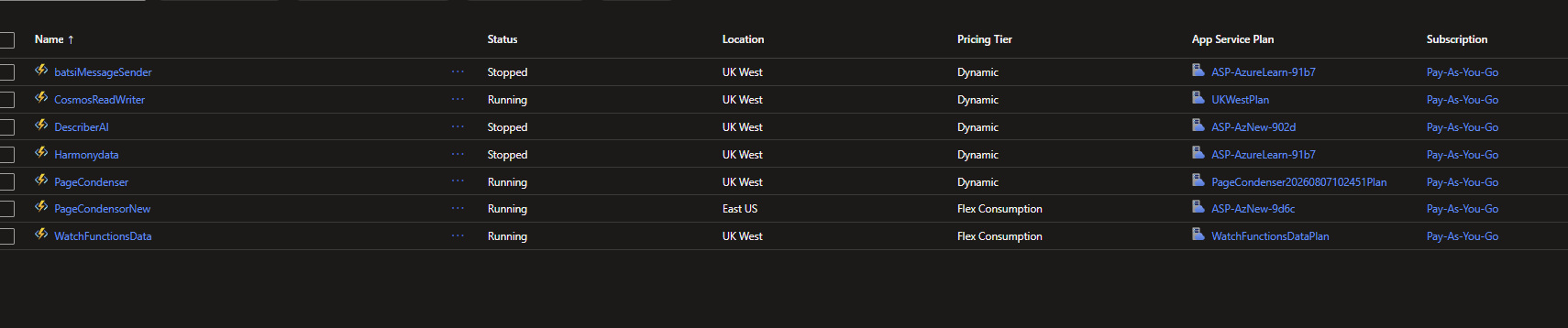
Some pre-requisites:
- Your Function Apps must all be in the same Azure region
- Your Function Apps must all use the same underlying Operating System
- Important -> Your Function Apps must exist in the same Resource group of where the target App Service Plan is in and NOT have had their resource groups moved to fir this requirement. Should a resource group for a Function App be different to the Target AppService Plan then these steps will not work (More on this soon in the future).
Identify the target Y1 App Service Plan
We will first choose the host Y1 App Service plan to 'hold' each of our function apps:
az functionapp plan show --name <TARGET_Y1APPSERVICE_PLAN_NAME> --resource-group <RESOURCE_GROUP>We will keep a note of the 'id' from the json result here which represents the serverFarmId that belongs to this Y1 App Service Plan. Also note that the number of "sites" is 1.
Update Each Function App to 'move' to another App Service Plan
Run the following Function App update az cli command:
az functionapp update --name <YOUR_FUNCTIONAPP_NAME> --resource-group <RESOURCE_GROUP> --plan <TARGET_Y1APPSERVICE_PLAN_NAME>This command will bring back a json result and critically, you should notice the New serverFarmId now to be the one we identified in the first step. For me, my target App Service Plan is called UKWestPlan
After a refresh of the Azure function , we should now notice a change in the assigned App Service Plan
Before:

After (same Azure Function, new App Service Plan):

We can do this for the rest of our Consumption Plan Apps (Up to 100).
This should make things a little much better organised 😊.
My Results and findings
I managed to shift some of my Azure Function Apps, but I did discover that some of my apps would not be allocated to UKWestPlan because of the following error message which was rather misleading too:
"Cannot change the site [site] to the App Service Plan [plan] due to hosting constraints.
If using '--plan', a consumption plan may be unable to migrate to a given premium plan. Please confirm that the premium plan exists in the same resource group and region. Note: Not all functionapp plans support premium instances. If you have verified your resource group and region and are still unable to migrate, please redeploy on a premium functionapp plan."
From my investigations on the Azure Functions where this move didn't work, this is because of the webspace of the original AppService being still tied to the Azure Function, therefore not allowing a new binding to be completed to a different Y1 AppService. The issue is nothing to do with premium plans. I will hope to write on this more in the future with further investigating.
For now this is the state of my azure functions
